About Teacher Gradebook
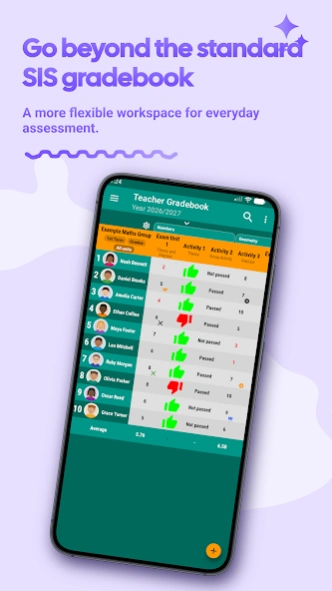
📚 A more flexible teaching workflow—alongside your SIS Your school or district SIS is the official system of record. Teacher Gradebook gives you a flexible daily workspace for the teaching work behind those records:...
📚 A more flexible teaching workflow—alongside your SIS
Your school or district SIS is the official system of record. Teacher Gradebook gives you a flexible daily workspace for the teaching work behind those records: grading, assessment, attendance, lesson planning, notes, student progress, and reports.
Use it alongside the SIS your school requires. Calculate and analyze grades your way, collect assessment evidence, and prepare the information you later enter into the official system. Teacher Gradebook works independently: it does not replace or automatically sync with your SIS.
Tired of juggling spreadsheets, paper notes, calendars, and multiple SIS screens? Bring your daily classroom workflow together in one organized app.
👨🏫 Built by a teacher, for teachers
Teacher Gradebook was created by a classroom teacher who understands the realities of teaching. It is intuitive, visual, and flexible, so you can adapt it to your grading system without being a technology expert.
📊 Grade and assess your way
• Enter numeric grades, text, icons, and visual ratings
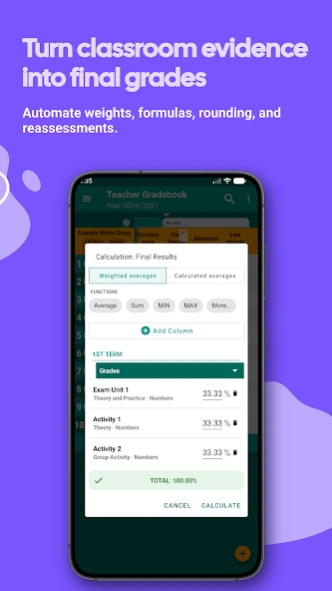
• Calculate simple or weighted averages
• Create custom formulas and calculated columns
• Configure weights, rounding, and reassessments
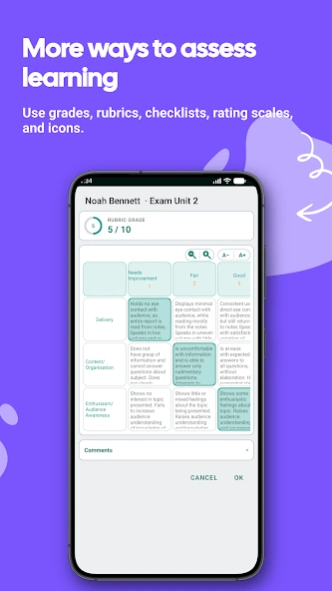
• Use rubrics, checklists, and rating scales
• Create editable rubrics with AI assistance
• Assess students individually or in teams
• Add comments and observations
• Export grades and reports to PDF or CSV
Teacher Gradebook adapts to your assessment approach instead of forcing your classroom into a rigid template. Every result remains clear, editable, and traceable.
📅 Organize your classroom
• Track attendance, absences, tardies, and incidents
• Create seating charts and take attendance directly from the chart
• Manage class schedules and non-instructional days
• Plan lessons, class sessions, and instructional units
• Add reminders and view upcoming sessions
• Keep a class journal by date, class, or student
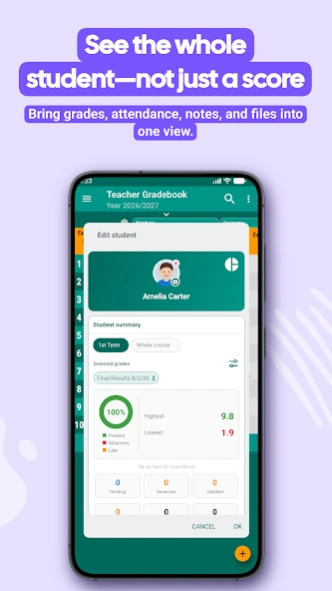
• Store student profiles, contacts, photos, notes, and files
• Import student rosters from CSV files
Your grades, attendance, planner, journal, and student profiles share the same information, so you do not have to enter the same data repeatedly.
📈 See progress clearly
Review grades, attendance, ungraded activities, and classroom notes without rebuilding everything at the end of a grading period.
• Individual student and whole-class reports
• Grade charts and statistics
• Attendance and class journal reports
• Edit compatible grades and comments directly from the Grade Report
• Create editable AI-assisted narrative reports before exporting
🔒 Private, offline, and under your control
Your academic data is stored encrypted on your device. You can do your core classroom work without an Internet connection and protect access to the app with a password.
Student information is not stored on the developer’s servers. Optional cloud backups go directly to your own Google Drive, Dropbox, or OneDrive account. You can also configure automatic backups and choose where your information is stored.
🎨 Make it yours
Customize colors, icons, columns, layouts, and table styles. Use light or dark mode and work comfortably on both phones and tablets.
Keep your required SIS as the official record. Use Teacher Gradebook as your personal, flexible workspace for the daily work that official grades are built on.
Spend less time managing spreadsheets and administrative tasks—and more time teaching and supporting your students.
More information and tutorials:
https://cuadernodelprofesor.com
Previous Versions
Here you can find the changelog of Teacher Gradebook since it was posted on our website on 2016-09-17 07:45:42.
The latest version is 10.4.2 and it was updated on 2026-10-06 10:49:21. See below the changes in each version.
Teacher Gradebook version 10.4.2
Updated At: 2026-10-05
Changes: 📂New! Organize your grade types into reusable folders across academic years.
📊 Import rubrics, checklists and rating scales from Excel or Google Sheets.
🛠️ Bug fixes and stability improvements.
Teacher Gradebook version 10.2.1
Updated At: 2026-09-06
Changes: 📥 New! Easily import your students and rubrics from Excel files.
🛠️ Bug fixes and stability improvements.
Teacher Gradebook version 10.1.3
Updated At: 2026-08-31
Changes: 📥 New! Easily import your students from Excel files.
🛠️ Bug fixes and stability improvements.
Teacher Gradebook version 10.0.5
Updated At: 2026-08-20
Changes: 🎓 New Premium FP, designed for Vocational Education and Training teachers!
📚 Manage learning outcomes and assessment criteria based on the official curriculum.
⚖️ Configure weights and automatically calculate competency-based grades.
🗂️ Link teaching units and activities to assessment criteria.
🏢 Track workplace training and Dual VET, all integrated into your gradebook.
Teacher Gradebook version 9.6.4
Updated At: 2026-08-10
Changes: 📝 Edit grades and comments directly from the Grade Report!
🌙 New dark mode: sleek and easier on the eyes.
✨ Modern redesign with cards, colored chips, and smoother visuals.
📋 New assessment tools: checklists and rating scales.
🪑 New Seating Plan: arrange students and take attendance.
📔 New Class Diary: record notes and highlights for each session.
📅 Planner: weekly calendar, reminders, non-teaching days, and teaching units.
🤖 New AI-powered student reports!
Teacher Gradebook version 9.3.0
Updated At: 2026-07-22
Changes: 🌙 New dark mode! A sleek dark UI that’s easier on the eyes.
✨ Fresh app redesign with modern cards, colored chips, and a smoother visual experience.
📋 New assessment tools: checklists and rating scales.
🪑 New Class Seating Plan! Arrange students visually and take attendance from the plan.
📔 New Class Diary! Log notes and highlights for every session.
📅 Class Planner: weekly calendar, reminders, non-teaching days, and linked teaching units.
🔄 Improved auto-sync
Teacher Gradebook version 9.0.4
Updated At: 2026-07-05
Changes: ✨ Fresh new app redesign! A modern card-based interface with colored chips, a smoother, more visual experience throughout the app
📋 New assessment tools: checklists and rating scales
🪑 New Class Seating Plan! Arrange students visually and take attendance right from the plan
📔 New Class Diary! Log notes and highlights for every session.
📅 Class Planner: weekly calendar, reminders, non-teaching days, and linked teaching units
🤖 New AI-powered student reports.
🔄 Improved auto-sync
Teacher Gradebook version 8.3.0
Updated At: 2026-06-24
Changes: 📅 New Class Planner! Weekly calendar, reminders 🔔 and non-teaching days. Link each session to its teaching unit and keep track of completed and pending classes.
🤖 New AI reports. Improves the AI providers
💾 Revamped backup module
🔄 Improved auto-sync
📋 New activity log
📄 PDF export with better quality and design.
📱 Now requires Android 7.0 or higher
Teacher Gradebook version 7.8.1
Updated At: 2026-06-09
Changes: Fixed an error exporting student comments on PDF reports
Teacher Gradebook version 7.8
Updated At: 2026-03-31
Changes: - Added a new AI assistant to design and create new assessement rubrics
- Improved the calculator to calculate average grades